 Formsafe Contact Form
See why a message didn't reach you
Each entry shows Sent to your mail server, Failed with your server's own error, or Not sent. Resend, or send a test email.
Free contact form plugin for WordPress
Formsafe saves each message in your WordPress dashboard before it sends anything, then shows you, entry by entry, whether your mail server accepted the notification — and the error it gave when it didn't.
Why it's off: new plugins wait in WordPress.org's review queue. The button goes live the day the listing exists.
Saved to Entries first
Illustration · sample entries
How it works
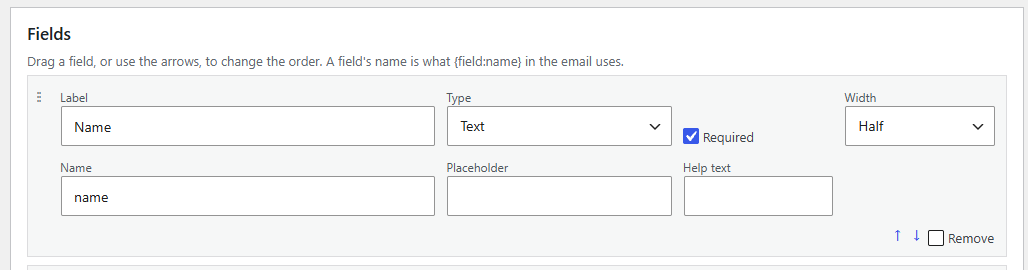
One box per field — label, type, required, width — in plain sight. Or start from one of four templates.
The Formsafe Form block, or [formsafe id="…"] in a classic editor or page builder.
Saved first, then emailed — with the mail server's answer next to it, and Resend one click away.
Why Formsafe
Each entry shows Sent to your mail server, Failed with your server's own error, or Not sent. Resend, or send a test email.
It's stored in WordPress before any email is attempted. If sending fails, the entry stays, marked Failed, with everything the visitor typed.
A honeypot, a time trap and a limit per IP address are always on. Turnstile, hCaptcha or reCAPTCHA v3 are optional, on your own keys.
Reply-To is the visitor's address, and the From address stays on your own domain — with a check that tells you when it doesn't.
The importer reads your CF7 forms, shows first what can't come along, and lists every page a CF7 form sits on.
IP addresses aren't stored unless you choose to, old entries can delete themselves, and WordPress' privacy tools find entries by email.
The real thing
The Entries list keeps everything — including the one your mail server refused, with the exact error it gave.
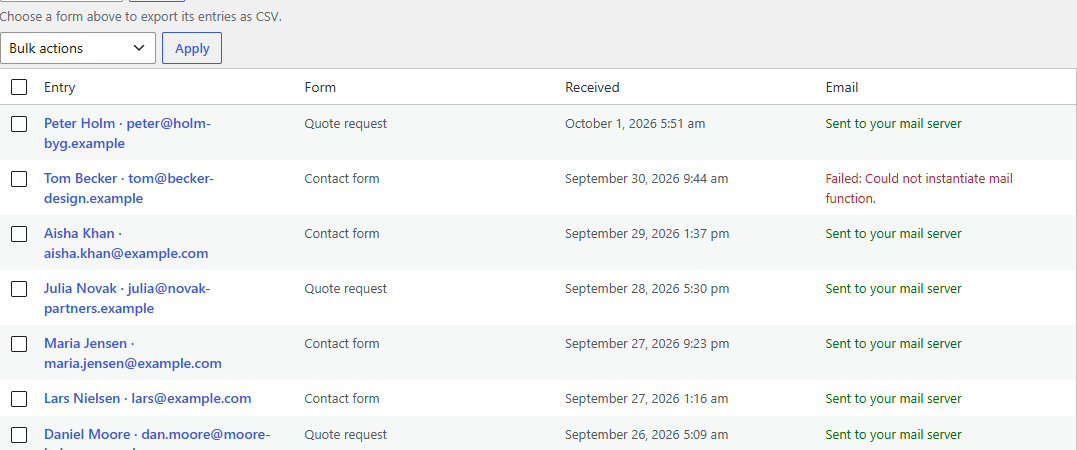 Failed — with your server's own error
One entry shows the page it was sent from, exactly when your mail server took it — and Resend, if it didn't.
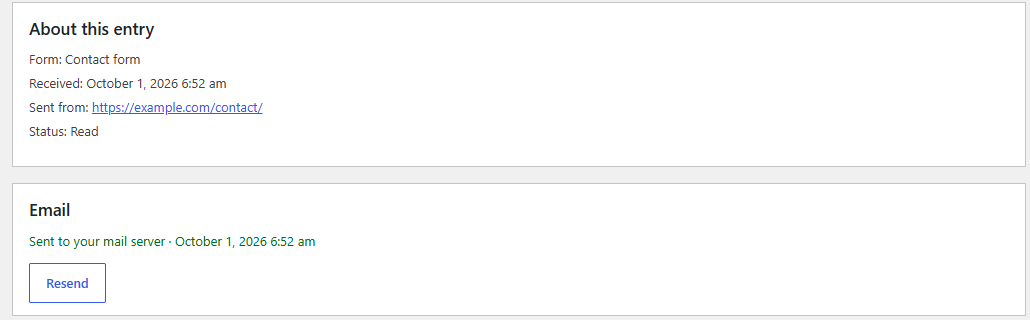 The page it came from
Accepted, and when — or resend
The page it came from
Accepted, and when — or resend
Even without JavaScript: what to fix stands above the form, the field is marked, and the rest is still filled in.
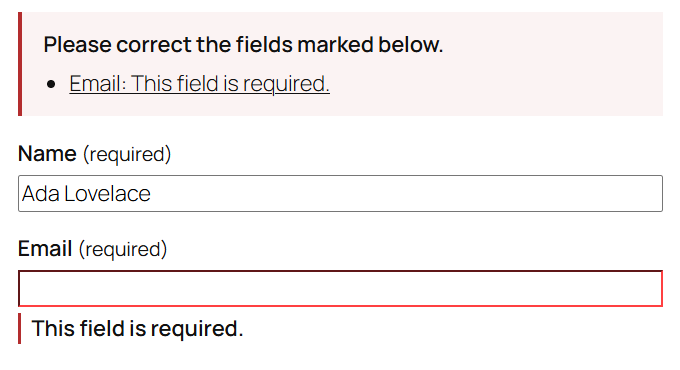 What to fix, at the top
The field, marked
What to fix, at the top
The field, marked
Formsafe Pro · paid add-on
Pro sends each entry on to the services you already pay for, using API keys from your own accounts.
One site per licence · plus VAT where applicable · Compare free and Pro
Not on sale yet. Pro installs on top of the free plugin, and the free plugin isn't in the WordPress.org directory yet.
Illustration · a refused key never loses an entry
Free and Pro
| What it does | Free | Pro |
|---|---|---|
| Forms with 11 field types, four templates, block and shortcode | ✓ | ✓ |
| Every entry saved, searchable, exportable to CSV | ✓ | ✓ |
| Mail status per entry, Resend, Send test email | ✓ | ✓ |
| Honeypot, time trap, IP limit — plus Turnstile, hCaptcha or reCAPTCHA v3 | ✓ | ✓ |
| Import from Contact Form 7, forms in and out as JSON | ✓ | ✓ |
| Entries sent on to Mailchimp, Brevo, Kit, MailerLite, ActiveCampaign, HubSpot or a webhook | — | ✓ |
| Failed deliveries kept and sent again for up to 7 days, with an alert email | — | ✓ |
| $0 | — |
Questions
Complete. Nothing in it is locked or time-limited, there is no limit on how many entries it keeps, and it never asks for a licence. Pro adds a separate job: passing entries on to other services.
Like Contact Form 7 and WPForms, Formsafe hands the message to wp_mail(); your host's mail server or SMTP plugin does the rest. What changes is that you can see what happened — and the entry is saved either way.
Yes: it sends through WordPress' own wp_mail(), the function SMTP plugins such as WP Mail SMTP and FluentSMTP take over, and records the outcome WordPress reports back.
The free plugin sends nothing to us. It contacts Cloudflare, hCaptcha or Google only to check a CAPTCHA answer, and only if you switch one on. The privacy policy lists every call.
Nothing switches off. Your connections, the retry queue and the alert emails keep running, and no data is removed. Updates and support stop, and one notice on Formsafe's Settings screen says so.
Its stylesheet and script load only on pages that show a form, and they don't need jQuery. Entries live in two tables of Formsafe's own, not among your posts.
The download opens here once WordPress.org has approved the listing.